


Extractly desktop app
BootEase
Desktop appsv2.0.0
BootEase
Open BIOS, recovery, and system details without racing the startup key
BootEase gives Windows users direct, confirmed actions for firmware settings, Windows Recovery, common restart tasks, and a clear overview of the computer.
Version 2.0 available now
Installer and portable builds for BootEase 2.0.0 on Windows x64.
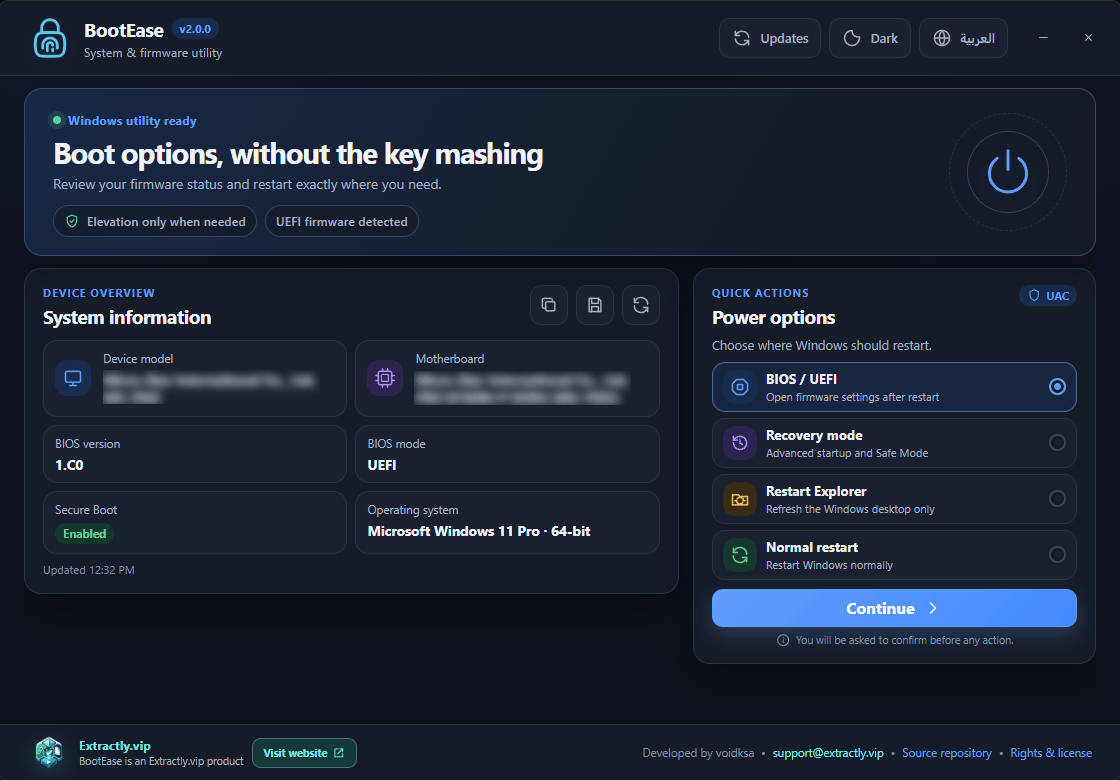
One app, four essential tasks
Four direct paths through Windows startup and recovery
Choose firmware, recovery, system information, or a restart action from one place. BootEase shows what will happen before it asks Windows to continue.
- BIOS and UEFIRestart directly into firmware settings on supported computers.
- Windows RecoveryOpen Advanced Startup and recovery options without timing an early boot key.
- System overviewCheck the motherboard, BIOS mode and version, Secure Boot, Windows version, and architecture.
- Controlled elevationRuns normally and requests UAC only after you confirm an action that needs it.
Open source
Open source · GPL-3.0
Before you restart
Save open work before confirming a restart, recovery, or firmware action.
- Type
- Desktop apps
- Price
- Free
- Platform
- Windows 10 and 11 · x64
- License
- GPL-3.0
- Version
- 2.0.0
- Status
- Available now